

Sections are containers for a course's related learning materials. A section can be considered a chapter, subtopic, module, or an arbitrary container where everything a learner needs to interact with is located.
Follow the steps below to add a Section to the curriculum:
Navigate to the course you wish to build and select Curriculum from the course navigation.
Click + Create below the list of Curriculum items to add a new section to the end of the course. Use the + to the right of the list of Curriculum items to add a new section directly below the selected item or within the selected section (to create a nested section or sub-section). Then, select Section from the menu.
Double-click the new section activity to edit it.
Click Video Source to add your video.
Sections can also include a brief introduction (optional) that will appear above other activities within the section. If there are specific instructions regarding the following content in your section, the Introduction is an ideal place to add them.
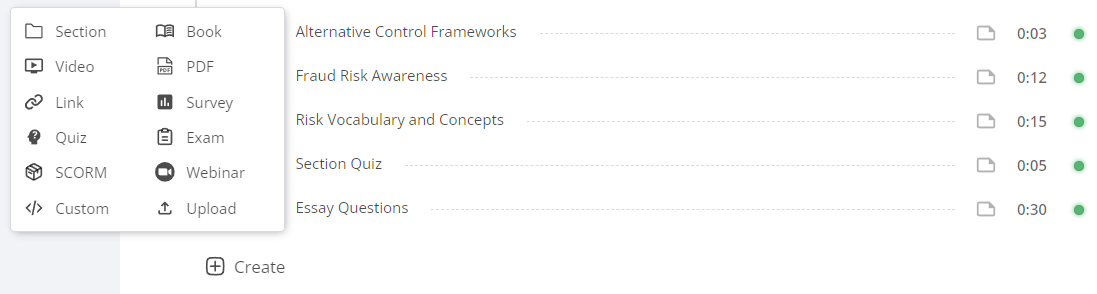
The Curriculum allows you to add as many sections as you need to house and deploy your learning materials effectively. Single-level courses do not require sections, whereas multi-level courses require sections to better organize the learning content.
Typically a section will include one or multiple videos, some required reading, and a quiz to assess the learner's understanding of the material. Sections can also be moved using the drag-and-drop functionality or by clicking the three dots to the right of each activity and selecting Move.
TIP: Think of sections as containers that be used to organize related learning activities. It is common practice to use sections for chapters or units. Additionally, sections can provide learners with a course schedule (e.g. Week 1, Week 2, etc.)