

Acadio can automatically enroll students in courses via an integration with Shopify, WooCommerce, or BigCommerce. However, there may be situations where a student must be manually enrolled in a course.
Follow the steps below to add a student to a course:
Navigate to the course you’d like to invite a student to.
Select Students from the course menu.
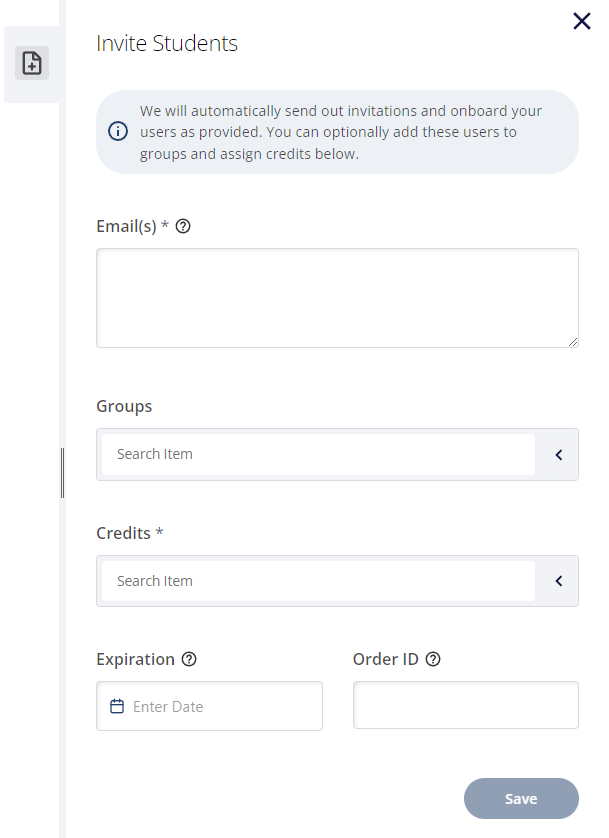
Click the Invite Students tab in the drawer on the right side of the screen.
In the Email field, enter the student's email address you’d like to invite. If you're inviting more than one student, you can enter multiple email addresses (up to 1,000) on separate lines.
Leave the Groups field blank. Groups are generally used to scope administrative rights and privileges.
Select a Credit from the list of available credits.
If you need to override the default credit expiration (this is not typical), select the date by clicking on the Expiration field. Additionally, you can enter an order ID to be associated with this credit assignment in the Order ID field.
When finished, click the Save button.
New platform users receive an onboarding email prompting them to complete the account creation process. Existing platform users do not receive an email but have immediate access to any courses associated with the credit.
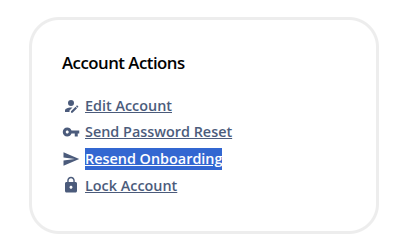
If a user is unable to find the original onboarding email, we make it easy to help. Select Users from the main menu, then click the user in the list. Then, click Resend Onboarding.
Additionally, you can assign credits to existing users from the Manage User screen.